B737 Driver Controller
A must have app for users building their B737 homecockpit with Opencockpits modules.
! Forum alert !
After transferring www.flightsim4fun.com to a new hosting provider, users can no longer register for an account or log in to the Old Forum.
Users can still access the Old Forum and read existing topics.
Register and use the New Forum for any new issues.
If you are looking for updates to any of your rksoftware apps, click Downloads
If you have scaling issues when using any of the rksoftware apps, try this:
Right‑click your EXE
2. Choose Properties
3. Go to Compatibility
4. Click Change high DPI settings
5. Enable:
• Override high DPI scaling behavior
• Scaling performed by: System or System (Enhanced)
Which one to choose?
• System → safest, most predictable
• System (Enhanced) → sometimes sharper, but not always supported by WinForms
Start with System.
Contact Us
Have questions? We're here to help you fly smoothly.
Or check out the support forum
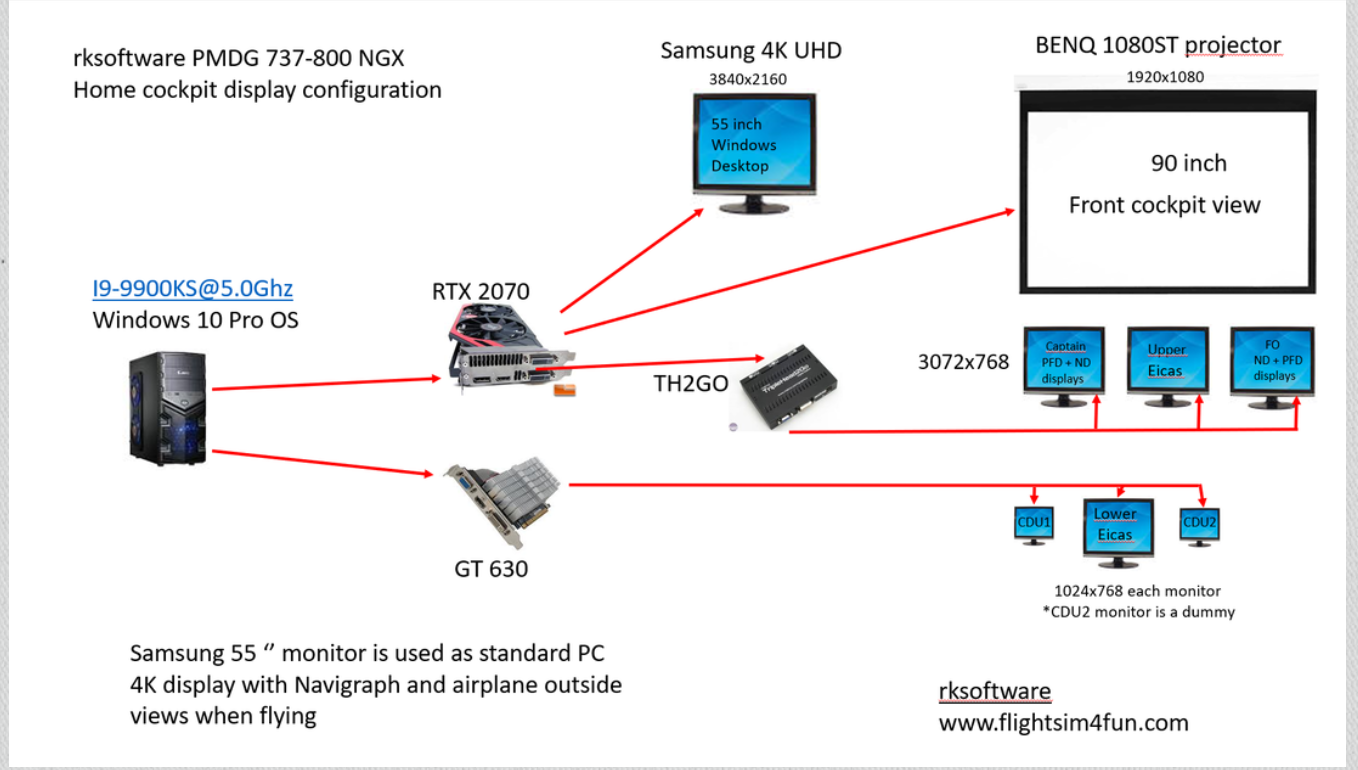
The PMDG 737 in MSFS supports pop‑outs of PFDs, NDs, EICASs and CDUs.
rksoftware recommend using
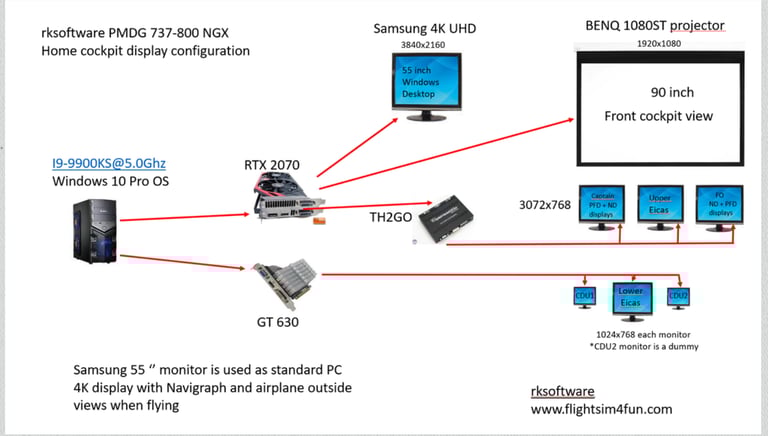
There are many ways to set up your displays. It all depends on how many monitors and video cards you have installed.
Here is how rksoftware's PMDG 737-800 NGX Home cockpit is built up.
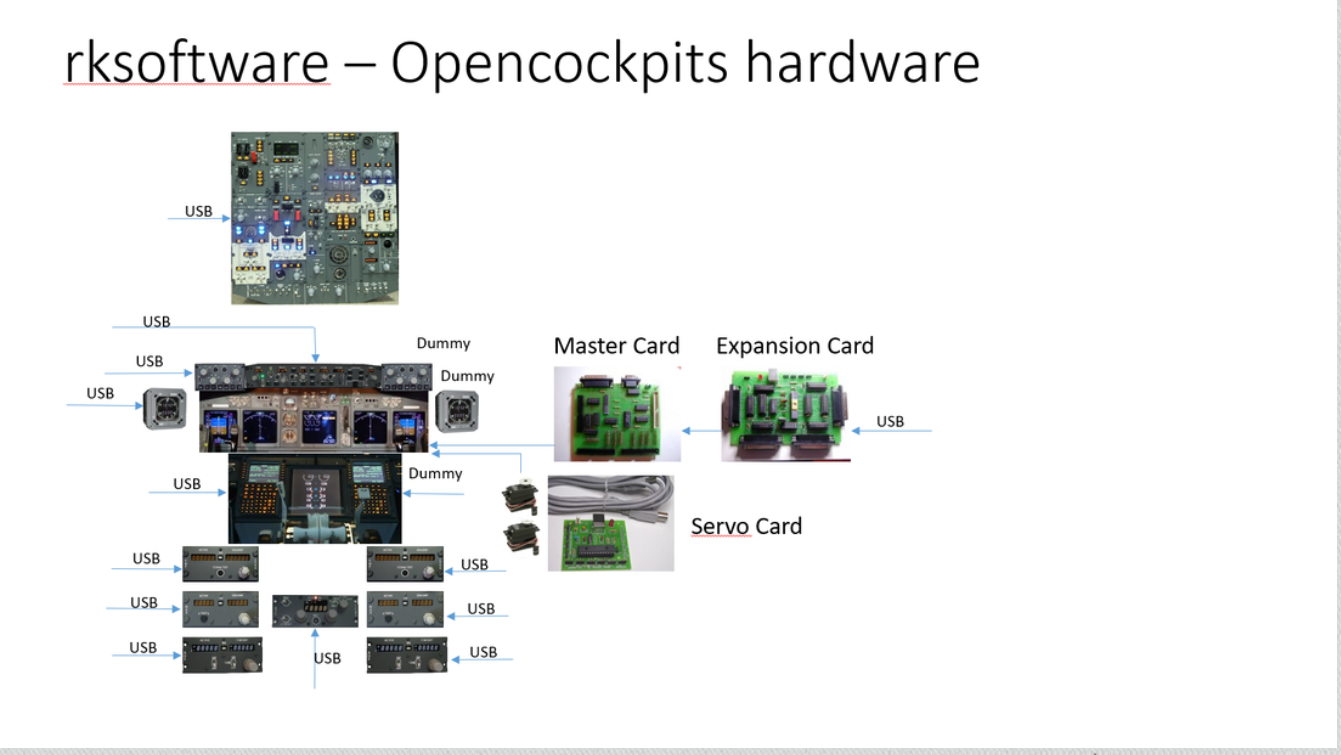
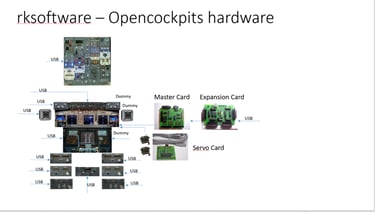
The information below was written for the OC4BAv5 product which has been replaced by the new Oi4FS24. The OC4BAv5 features and functions plus improvements are now implemented in the new Oi4FS24 that is available from the Store.
The scripts for the PMDG 737 airplanes that come with OC4BAv5 and Oi4FS's PMDG 737 driver work with Opencockpits’ ready built P&P modules
CHRONO-Captain, EFISCaptain, MCP, EFIS-FO, CHRONO-FO, FMC-Captain, FMC-FO, COM1, COM2, NAV1, NAV2, ADF1, ATC, AUDIO1, AUDIO2 and OVH-FWD, OVH-AFT, MIP and PEDESTAL without any need for modification.
This script should be used if no modification is needed or serve as a base if modification is needed.
When is script modification needed?
1. If you have built any of the above listed modules based on Opencockpits IOCARDs and the connection numbering scheme is different than the default numbering scheme that is used in Opencockpits built modules.
2. If you have any of the modules listed below, either Opencockpits built modules or own built modules based on Opencockpits IOCARDs.
3. If you have any COM1, COM2, NAV1, NAV2, ADF1, ATC, AUDIO1, AUDIO2 modules using the IDC interface. The needed modifications are easy to do with the OC4BAv5 and Oi4FS Script Edit function. You only need to change the input, output and display connection numbers.
In case 3 above, you also need to modify the script so it uses Device 32 for any IDC connected modules. If your own built modules are not complete, there can be issues like “jumping” switches or modules that do not work correctly. You must then make modifications to the script to get rid of these issues. Disable none used inputs by inserting a "//" at the beginning of the script line of the input causing an issue.
This is done to the script .txt file and followed with a compilation to a script .ssi file.
PEDESTAL*
If IDC interface is used and not P&P modules for the COM, NAV etc., Device 32 must be used and inputs and outputs connection numbers changed to default PEDESTAL or your own numbering scheme.
All Servos needs to be calibrated and if needed the script must be modified.
Check out some Youtube videos here at my Youtube channel: https://www.youtube.com/user/roarkr51/videos
Here is some old information about using Opencockpits hardware and software.
FAQs
How to start a driver in Oi4FS24?
Launch MSFS and select an airplane - that's all
System requirements?
To use Oi4FS24 you need Opencockpits modules and MSFS/Prepar3D
Can I use a joystick and other hardware
Yes, Oi4FS24 does not interfere with USB joysticks and other flight controllers.
Where to find help if needed?
Click the Support Forum on the main page for all non-installtion related questions - For first time installation related questions use the Contact Us form above.
Copyright © 2026 rksoftware Norway.
Oi4FS24 from rksoftware is for private, non commercial/non professional/non training use only.
In addition users of Oi4FS24 must adhere to the PMDG 737, PMDG 737 SDK, PMDG 777X, PMDG 777X SDK, PMDG B747 and PMDG B747 SDK EULAs.
Disclaimer: There is no warranty, guarantee of any kind, and I am not liable for any problems you may encounter while using rksoftware products. If you crash your aircraft I won't buy you a new.